HUD Device
Views
From Earn2Life Wiki: Money-Making in Second Life
(Redirected from Earn2Life HUD)
 English


The E2L HUD (Heads-Up Display), is an in-world tool allowing members to get new In-world offers, complete them and see their account stats.

(We constantly add new features and update the device so the actual view of the HUD may differ from the one shown above)
How To Get Your HUD Device
Teleport to the Earn2Life.com in-world office and locate the E2L HUD vendor; click on it to obtain the most recent version. You may also contact any E2L member and get a copy of their HUD. This has the added benefit of apprenticing you to that person and they will be expected to coach you through your first few offers and answer any questions you may have.
How to Use Your HUD
Go to your Inventory-->Objects, locate the Earn2Life.com HUD and choose 'wear'. The HUD will appear on your screen (see the screenshot above).
Turn it on by clicking the Turn On link located at the top of the HUD.
Choose the type of offer you would like to complete by pressing the Select Offer button in the appropriate section of the HUD.
A pop-up will appear on your screen with the available offers. Use the Next button to cycle through the offers (Pay4Visit example shown here).
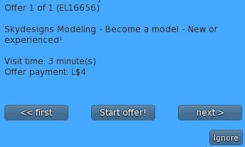
When you select an offer you will be given a Landmark. Teleport to that location and complete the terms of the offer.
Once the offer has been completed, the HUD will confirm payment and turn itself off. You may now delete the Landmark and proceed to your next offer.
If you decide not to take any more offers, be sure to turn the HUD off before detaching it.
Refer to the HUD Device Controls page to learn more about how the HUD device works.
Obtaining Apprentices Using The HUD
You can invite other residents to join Earn2Life.com and give them your HUD (it's copyable).
Any resident that wears a copy of your HUD becomes your apprentice and you will receive commission from their earnings.